
Pay no attention to the wizard behind the curtain. Except when it comes to your website updates, you probably should.
Let’s talk about the least glamorous part of having a website.
No, not writing the About page. Not choosing between twelve nearly identical shades of beige. Not debating whether a button should say Learn More, Get Started or something wildly creative like Let’s Talk. I’m talking about the stuff happening behind the scenes: WordPress updates, plugins, themes, PHP versions, security patches, backups and compatibility checks.
I know. Riveting.
Except here’s the thing: while nobody visits your website thinking, Wow, I wonder what version of PHP they’re running, all of that behind-the-scenes technology has a very real impact on the experience your visitors do have. A website can look beautiful on the outside and still be struggling underneath. And just like a gorgeous restaurant with questionable plumbing, eventually, something is going to make itself known.
That is why keeping your website technology current isn’t simply a matter of checking boxes in a WordPress dashboard. It is part of taking care of the website you worked so hard to build.
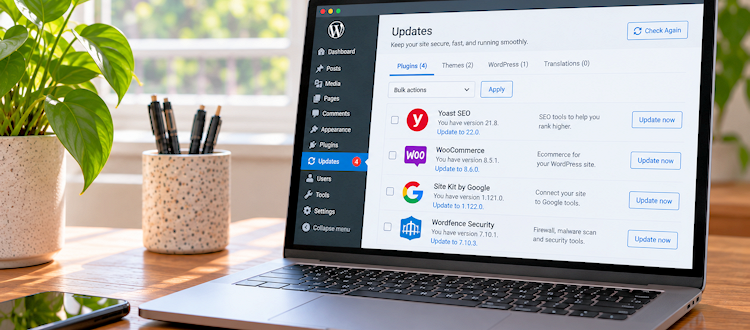
You just updated the plugins. Why are there already ten more updates?” That’s because website technology never really stops moving, and new security patches, fixes and improvements are constantly being released.
Your Website Isn’t Finished When It Launches
There is a funny misconception that a website is a little like a house: you build it, decorate it, open the door and then you’re done.
Wouldn’t that be nice?
In reality, a website is much closer to a living system. The software underneath it continues to change. WordPress releases updates. Plugin developers release new versions. Themes evolve. Browsers change. Hosting environments change. Security vulnerabilities are discovered. PHP, which is one of the foundational technologies WordPress relies on, eventually reaches the end of its supported life.
Meanwhile, your website is sitting there happily doing its thing, collecting contact forms, displaying your services, selling products, serving up blog posts and hopefully making your business look fantastic.
The problem is that websites don’t always tell you when something important is starting to fall behind. Sometimes you get a friendly little notification in the dashboard. Sometimes you don’t notice anything at all until a form stops working, a page suddenly looks strange or your hosting company sends you an email that contains the phrase “End of Life,” which is never a phrase anyone wants associated with their website.
Keeping everything updated helps prevent that slow slide from working perfectly to why is the homepage doing that?
Website updates aren’t a one-and-done project. Your site depends on software that is continually being improved, patched and updated, so keeping it healthy means keeping up with those changes.
Plugins Are Helpful. They Also Need Adult Supervision.
One of the reasons WordPress is so popular is the sheer amount of functionality you can add to a website without having to build everything from scratch. Need a contact form? There’s a plugin for that. Want better SEO tools? Plugin. Selling products? Plugins. Backups, security, analytics, events, galleries, memberships, bookings—you get the idea.
Plugins are incredibly useful, but they aren’t “set it and forget it” technology.
Every plugin is a small piece of software interacting with the rest of your website. When WordPress changes, plugins may need to change with it. When PHP changes, plugins need to be compatible with that version of PHP. When a security vulnerability is discovered, the developer may release a patch specifically to address it.
And sometimes a plugin isn’t being maintained anymore at all. That is where things get a little more serious. An outdated plugin isn’t automatically a sign that your website has been hacked, but running old or unsupported software can increase security, compatibility and reliability risks. The longer those components sit untouched, the more likely you are to eventually run into a problem.
This is one reason I recommend looking at website maintenance as more than simply clicking “Update Everything” once every six months and hoping for the best. Updates should be reviewed, compatibility should be considered and important functionality should be tested afterward.
Because clicking a button is easy. Fixing the thing that button accidentally broke? Less fun.
“PHP is the part of your website you never think about—until it becomes the part of your website you can’t ignore. It quietly powers so much of what happens behind the scenes, making its age and compatibility far more important than most people realize.”
Then There’s PHP: The Thing Nobody Sees but Your Website Needs
PHP is one of those website technologies that lives almost completely outside the average business owner’s field of vision. You don’t see it in your navigation. Your customers don’t know it’s there. It isn’t going on your homepage next to your beautifully written brand story.
But PHP is an important part of the engine underneath many WordPress websites.
The tricky part is that PHP versions don’t stick around forever. Older versions eventually reach End of Life, meaning they are no longer receiving ongoing support and security fixes from the PHP project. When a website continues running on an outdated version, the issue isn’t necessarily that something is immediately broken. The bigger concern is that you’re relying on technology that is no longer receiving the same level of support as a current version.
And upgrading PHP isn’t something I recommend treating like changing the font on your website. Before making the switch, the website should be reviewed and tested to make sure the WordPress version, theme, plugins and custom functionality can work properly with the newer PHP environment. Older themes and plugins can sometimes contain code that doesn’t play nicely with newer versions, which can result in anything from warnings and strange behavior to broken functionality or, in more serious cases, a site that doesn’t load correctly.
The good news is that this is exactly the kind of thing that can be managed with a proper compatibility review and testing process. The goal isn’t to change things for the sake of changing them. The goal is to bring the technology forward without breaking the website you’ve already invested in.
Your WordPress theme is another piece of the puzzle that deserves attention.
When we talk about a website’s “design,” it’s easy to think about colors, typography, images, layouts and all the other things visitors actually see. But underneath that visual experience is a theme responsible for helping WordPress determine how much of that content gets displayed and how the site functions.
Your website’s age matters, even when your customers can’t see it. A site can look modern while relying on technology that has quietly become outdated.
A theme that hasn’t been updated in years can become a problem, particularly when it is paired with newer versions of WordPress, PHP or other plugins.
That doesn’t mean every older theme needs to be thrown in the digital trash immediately. Sometimes an older theme is perfectly functional. Sometimes it needs an update. Sometimes it has become a compatibility concern. And sometimes it has reached the point where replacing it makes more sense than trying to keep a very old foundation alive indefinitely.
That’s why the answer shouldn’t always be “update everything.” Sometimes the smarter answer is review everything first.
But What About Google?
Ah yes. The other party in every website conversation: Google.
While Google doesn’t simply hand out gold stars because you updated your plugins this week, website maintenance can absolutely intersect with the things that matter to search performance.
Google wants to send people to websites that are accessible, useful and provide a good experience. A technically unhealthy website can create problems that get in the way of that experience. Performance issues, broken pages, accessibility problems, poor mobile experiences and security compromises can all have consequences beyond the backend of your website.
Security is particularly important. A compromised website can be altered to display spam, malicious content or unwanted redirects, potentially creating problems for both visitors and search visibility.
So, no, updating your WordPress plugins isn’t an SEO strategy by itself. But keeping your website healthy helps support the larger ecosystem that does matter: a functioning website, a good user experience, reliable content, security and a site that search engines can access and understand properly.
Think of it as preventative maintenance rather than an SEO magic trick. There is no shiny “Google loves me” button hiding in your WordPress dashboard. Sadly.
Good Maintenance Is the Kind Nobody Notices
Website updates may never be the most exciting part of running a business. Let’s face it, nobody is putting “updated WordPress core” on their vision board. There probably isn’t a scented candle called Freshly Updated Plugins. And if there is, I have questions.
But this behind-the-scenes work matters.
Keeping your plugins, theme, WordPress installation and PHP environment current helps reduce unnecessary security and compatibility risks, keeps your site running reliably and gives you a better chance of catching potential problems before they become very public ones.
Most importantly, it protects the investment you’ve already made in your website.
Because the goal isn’t to constantly tinker with something that’s working. The goal is to make sure it keeps working.
And honestly? That’s pretty good website maintenance.
Pay attention to what’s behind the curtain because that’s where your website’s health lives. The beautiful homepage gets all the attention, but the technology behind it is what keeps the show running.
So, What’s Behind Your Curtain?
Your website may look great on the outside, but what’s happening underneath matters just as much.
At Wicked Branding, we look at the whole picture — design, technology, content, usability, security and performance — because a website should do more than look good. It should work hard for your business without making you think about everything it’s doing behind the scenes.
That’s the sweet spot.


About Post Author